

Put your computer to code with you.
A code agent that runs on your machine, inside the browser. Open a folder from your disk and the agent reads, searches and edits the project with you, in a real editor. Free, no account, no API key, no cloud AI.


Open Code · Elffuss · Claw · Translator · Copilot · Shared core
Elffuss Code now lives in the UtopiaIA organization on GitHub, at github.com/utopia-ia/elffuss-code. It moved from github.com/KikoCis/elffuss-code on 23 October 2026; the old address redirects.
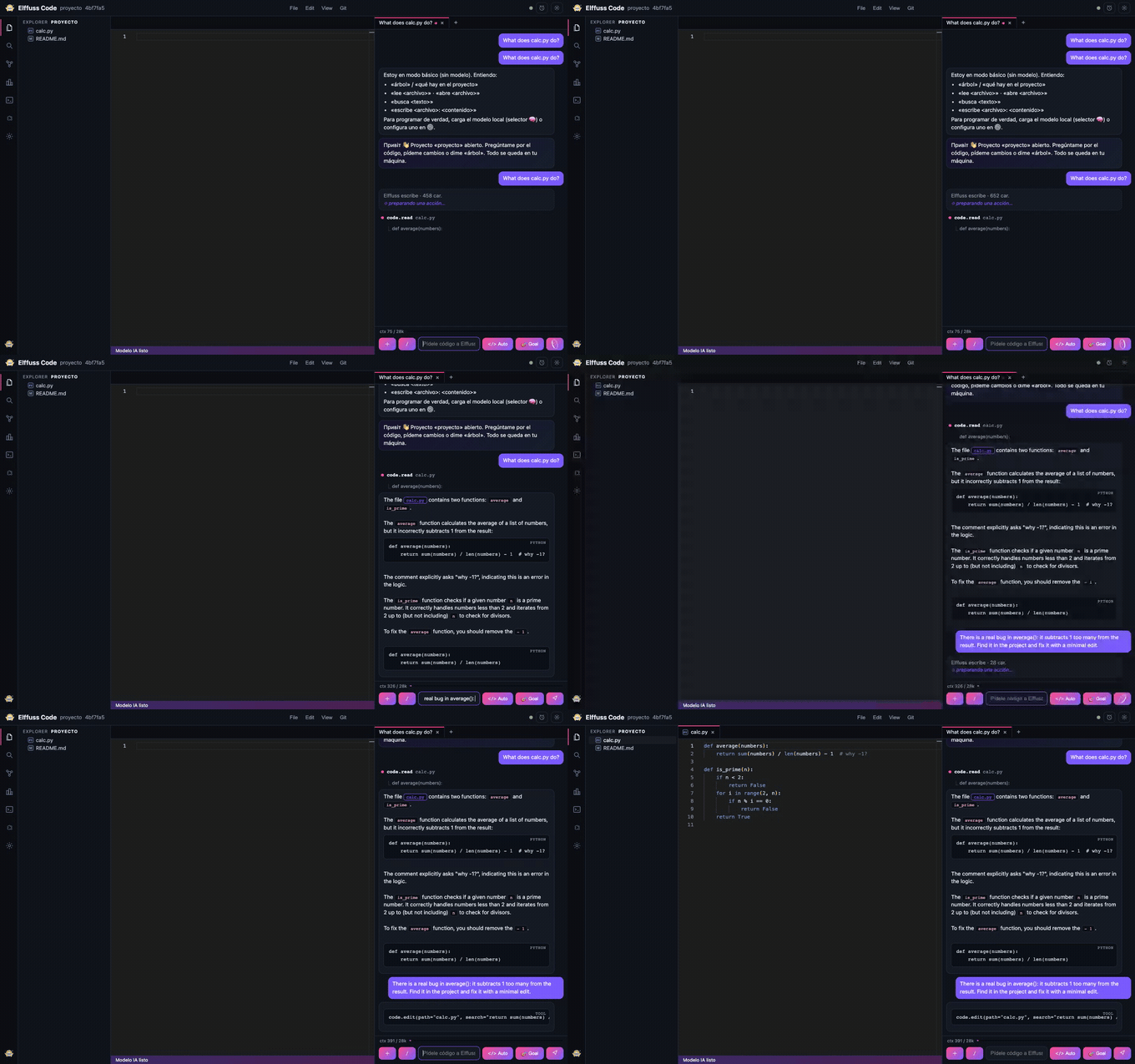
In the demo, a small model running entirely in the browser reads
calc.py, finds a real bug and fixes it with a minimal edit, using genuine tool calls, not autocomplete.
In this repository: why it is different · how it works · VS Code extensions · run it · architecture · shared core
- Your code stays on your machine. No upload, no account, no server round-trip. The folder is opened locally via the File System Access API.
- The model runs on your GPU via WebGPU — nothing is sent to a cloud API by default.
- Real tool-calling, not autocomplete. The agent reads files, greps the project and makes minimal, surgical edits — and you watch each tool call happen.
- Real editor. Monaco (the actual VS Code editor core), file tree, tabs,
Ctrl+S. - Zero install, zero build. Vanilla ES modules. Open the URL and you're in.
- Landing → "Open code folder" (File System Access — Chrome/Edge).
- IDE → file tree (left) · Monaco with tabs and
Ctrl+S(center) · AI chat (right). - The agent works only inside your project, through a small set of tools:
code.tree— list the projectcode.read— read a file (paginated, 100 lines at a time, can center on a line)code.search— grep across the project, with line numberscode.edit/code.write— make edits (the editor refreshes instantly)
- Local brain by default: Gemma-4 (E4B on desktop, E2B on mobile) via LiteRT-LM on WebGPU, with an ONNX / transformers.js fallback (Qwen3.5 0.8B) when WebGPU isn't available. External providers (OpenAI, Anthropic, Ollama) are opt-in in Settings — keys stay in your browser and calls go straight to the provider.
- Optional real terminal. A tiny local Bridge (opt-in) lets the agent run real
node/npm/pythonand read the output — still on your machine, nothing hosted.
The Extensions button in the activity bar (also View → Extensions…, or /extensions
in the chat on small screens) searches Open VSX
and installs the declarative part of VS Code extensions: color themes (with a
Color Theme picker), TextMate grammars, snippets and language configurations
(comments, brackets, indentation). You can also install a .vsix file.
- No extension code runs unless you turn it on for one extension (level 2, below).
Otherwise
main/browserare ignored; the panel says what each extension applies and what would need an extension host (commands, views, debuggers…). - Your project stays in the browser. Open VSX only sees what you search for and install.
- Packages are checked against the SHA-256 that Open VSX publishes and kept in IndexedDB.
- Grammars run on the same engine as VS Code (vscode-textmate + Oniguruma), loaded only
when a file needs one: the engine is vendored in
web/js/ext/vendor/(unchanged, MIT) and the Oniguruma WebAssembly comes from jsDelivr with an integrity check. Without extensions, nothing extra loads. - What a package brings is treated as untrusted data: grammars and themes are cleaned
of names that would reach
Object.prototype, snippet details are plain text (no remote images), regular expressions that repeat a repetition are dropped, andfirstLinepatterns run in a Worker with a time limit. The panel lists anything it had to skip. ?noextstarts with every extension paused (to rescue a tab from a bad grammar).
Web extensions (a browser entry, never Node) can run their code in a sealed sandbox:
a headless VS Code (@codingame/monaco-vscode-api 37.3.11, VS Code 1.138.0) inside an
invisible iframe on another site, with no network host in any CSP. Code's own editor
stays Monaco 0.52; it only talks to the sandbox through one validated message channel and
renders what extensions return as plain text or escaped markdown.
In the Extensions panel, before you install anything, each result says what will work:
the declarative parts (counted the way they apply: a language Monaco already has does not
count), "Runs in Code's sandbox" (with its commands, keybindings and settings),
"Needs Node: not available in the browser", the parts that won't appear here (views,
webviews, debugger…) and "Tested in Code" from the runtime census below. Where level 2
cannot run (Firefox, Safari, ?noext2, a site with no sandbox) the line says so with the
reason, the run button is inert, and the Works in Code chip keeps only what works
there. An extension that declares proposed VS Code APIs is marked: Code does not turn those
APIs on, so some of its parts may fail (the census shows many such extensions start). The
chip reads each result's manifest, which Open VSX then sees; the panel says so. Install
on a result that only brings code reads its manifest first (no download) and offers
Install and run its code…, which first shows what the extension will see, that it has no
internet and cannot save, the runtime's size and the extension's own (from a HEAD request to
Open VSX); nothing is downloaded until you accept. Installed extensions with code get: run or turn off
their code (no reload), state, their commands with Run buttons (the way in on a phone),
settings as JSON checked against what they declare, the formatter per language (theirs
or the built-in one), keybindings that were not bound and why, a log, and the number of
calls the sandbox refused. Their commands also appear in Code's palette (>), in F1 and
in the editor's context menu.
What keeps your data in your browser, and what enforces it:
- No network at all. The sandbox's CSPs name no host, not even its own; it refuses to
start if a self-test request is not blocked; WebRTC and
window.openare removed and navigation is cancelled in both of its documents. Extension files are fetched and checked by Code's page at install time (the SHA-256 that Open VSX publishes is required) and handed over as blobs, so the sandbox never talks to Open VSX. - No access to Code's storage. The sandbox is a different site: separate IndexedDB, OPFS, localStorage, cookies and process.
- One checked channel. Every message from the sandbox is validated by type, shape and
size; repeated violations tear the sandbox down. Inside the sandbox an RPC firewall
(
web/js/ext2/rpc-allowlist.json) refuses the extension host's calls that are not on the list: webviews, terminal, debug, SCM, tasks, sign-in, language models, chat, tunnels, notebooks, saving and more. - Text stays text. Hovers, completion details, signatures, diagnostics, notifications,
dialogs and pickers are drawn with
textContentor as markdown in which every punctuation character is escaped: no remote image, link or HTML. Decoration styles go through a whitelist (nourl(), nofontFamily); gutter icons are not shown. - Every address asks first and shows the full URL (control and bidi characters made
visible, the host in Unicode and punycode, the site repeated next to the buttons, a long
address scrolling in its own box):
openExternal, also when a completion or a code action runs it, and Cmd+click in the editor while extensions run. Avscode.Uriopens the way VS Code opens it (encodeURI(uri.toString(true)), so=,&and+stay as written). Block requests for this session blocks extensions' requests only (your own Cmd+click still asks); each dropped request is reported in the status bar, and the panel shows the block with an Unblock button. Links inside what extensions show are plain text. Clipboard writes need a recent click or key. A notification that waits for an answer is reachable from the editor with F6 (F6 again goes back) or from Code's palette. - Open documents only, no saving. Extensions see the files you have open, as
file:///<project path>; their edits go to the active document as one undo step and stay unsaved until you save with Cmd+S as always. An edit computed on text that changed in the meantime (the agent wrote the file, you typed) is discarded and the status bar says so. The agent's tools are unchanged. - Off means off. VS Code cannot unload an extension that already started, so turning one's code off (or disabling, updating or uninstalling it) while others run rebuilds the sandbox with the others; with none left, the sandbox goes away. No reload either way.
- Two gates in Code. The HTML preview of a file an extension wrote into asks first (the preview runs scripts with network). While extensions run, the agent's web requests and local runtimes (node, npm, python… through the Bridge) ask first, showing the full URL or command.
Proof: node tests/x2_canary.mjs runs an extension that tries every channel it has (30
from the worker, plus poisoned hovers, completions, signatures, diagnostics, decorations,
notifications, pickers, a code action and a completion that open addresses, forged RPC
frames) with Chromium resolving *.test to a beacon and recording a NetLog; it also runs
attack code directly inside both sandbox documents. The beacon must see 0 requests, 0
connections and 0 UDP packets; accepting one address must produce exactly one visit, to the
address the dialog showed; and positive controls show the setup does catch leaks.
- Nothing of level 2 loads until you turn an extension's code on.
tests/x2_bytes.mjscompares Code with its main before level 2 (which has level 1) request by request, uncompressed: with no extension it asks for exactly the same files and 616 bytes more (short hooks inmain.jsandide.js: the palette list, the preview gate and the list of open tabs); with level 1 extensions only, the same files and 4.2 KB more (the hooks injs/ext/host.jsandstore.jsthat decide when to loadjs/ext2/host2.js); with the Extensions panel open and a search done, the same files and 20,165 bytes more, within the suite's 20 KB budget (what the panel now tells everyone: what will work, the Works in Code filter, how extensions are isolated, the check before Install, which for a result that applies without code loads nothing of level 2). In none of these is anything fetched fromvendor/x2/,js/ext2/or the sandbox site. Once code is on, the runtime is 2.6 MB gzip (from the manifest), fetched once and then served from the HTTP cache.?noextpauses every extension,?noext2only their code,"enabled": falsein the manifest is a global kill switch, and the panel can turn all extension code off. - The runtime is verified at load: SRI on each
.gz, then the sha256 of the inflated bytes against the committedweb/js/ext2/vendor-manifest.json. It is built by a pinned, reproducible script and deployed separately; seevendor/vscode-ext2/README.md. - What doesn't work: Node-only extensions (81% of the catalog), anything that needs
the full VS Code interface (views, webviews, custom editors, notebooks, terminal,
debugger, source control, status bar), the network or the whole project, extensions that
replace typing (Vim, Emacs),
createQuickPickandcreateInputBox, gutter icons, and Firefox and Safari in this version. - Where the sandbox lives: for code.elffuss.com, on
https://x2.utopiaia.com, another registrable domain.web/js/ext2/config.jsnames it and refuses a sandbox on the same site as Code (a subdomain of elffuss.com would share cookies and a process);sandbox/x2/headers.jsonnames the same origin for the headers and nginx, anddeploy-sandbox.shchecks that both agree before uploading. Code on any other host gets no sandbox. To publish, in order: thedeploy.shfilter forvendor/x2/on main (any deploy without it deletes the bundle;deploy-vendor.shrefuses until main has it),sandbox/x2/nginx.conf.examplefor x2.utopiaia.com and Code's vendor location (Cache-Control withoutalways, so a missing file is never cached as immutable),deploy-sandbox.sh,deploy-vendor.sh, a read-only check withX2_SANDBOX=https://x2.utopiaia.com node tests/x2_headers.mjs, anddeploy.shlast (it refuses to ship a manifest whose build the server lacks). Locally, open Code onhttp://127.0.0.1:<port>withtests/lib/x2-server.mjs, which serves the sandbox onlocalhost:<port>(a different site).
What actually runs (runtime census, 2026-10-11). Of the 500 most downloaded extensions
on Open VSX, 89 have a browser entry. tests/x2_census.mjs installed each one from its
verified package (the web build, when the publisher ships one), started it alone in the
real sandbox with a beacon listening, and once the sandbox ran opened one sample document
per language it declares:
| Result | Extensions |
|---|---|
| Too large to install (over 32 MiB per file or 64 MiB per extension) | 8 |
| Start | 50 |
| …and register a command, a language feature or diagnostics | 34 |
| …and register language features (completion, hover, formatting…) | 14 |
| Fail while starting (Node modules or globals in their browser build, services or proposed APIs Code doesn't have, blocked network requests) | 23 |
| Never start (what starts them doesn't exist in Code: a workspace, the Markdown preview, custom editors, notebooks, sign-in; one starts and never finishes) | 7 |
| Refused: Vim replaces typing | 1 |
| Requests that reached the beacon | 0 |
It ran with the finished sandbox (the RPC firewall on, and notifications, dialogs and
pickers answered the way a hurried user would: closed or cancelled). 9 of the 89 asked the
user something while starting (8 notifications and 1 picker); GitHub Pull Requests stops at
the firewall's refusal of sign-in. An earlier run opened the sample documents while the
sandbox was still starting, when Code showed extensions only the active tab: CSS and
configuration-editing were counted as never starting and TypeScript's language features
were missed. Code now shows extensions every open tab, also the ones opened before the
sandbox started (tests/x2_ux.mjs, X11), and the census opens its samples once the sandbox
runs. Some extensions that start still need things Code doesn't have (webviews, the
network, a workspace), so the census is an upper bound; per-extension results are in
web/js/ext2/tested.json and feed the panel's "Tested in Code" lines.
Across the whole catalog (static census, 2026-10-11). tests/catalog_census.mjs listed
every extension the Open VSX search returns (19,338 that day, the catalog's size when the
listing ended) and read each one's latest package.json: 19,337, one publishes none.
Nothing was downloaded as a .vsix, installed or run; about 20,000 requests to the API at
most 2.5 a second. Each manifest was classified with the panel's own rules
(web/js/ext2/classify.js, Monaco's built-in languages, the runtime census above):
| All (19,337) | Top 1,000 | Top 500 | Top 100 | |
|---|---|---|---|---|
| Browser entry | 893 (4.6%) | 151 | 89 | 24 |
| …whose code could run in the sandbox | 849 (4.4%) | 116 | 56 | 15 |
Node only (main, no browser) |
15,729 (81.3%) | 694 | 307 | 70 |
| No code at all | 2,715 (14.0%) | 155 | 104 | 6 |
| Something applies without code (themes, grammars, snippets, languages) | 5,610 (29.0%) | 449 | 246 | 51 |
| Works in Code, either way | 6,152 (31.8%) | 516 | 280 | 58 |
| …only through its code | 542 (2.8%) | 67 | 34 | 7 |
| Nothing works in Code | 13,185 (68.2%) | 484 | 220 | 42 |
These are counts, not a sample: tests/catalog-census/summary.json has them with the date
and extensions.tsv has one line per extension, from which tests/x2_unit.mjs recomputes
every count. They are static: "could run" means a browser entry and nothing in the manifest
or the runtime census that rules it out (384 of the 849 also contribute views or other
parts that won't appear here and 32 declare proposed APIs; 52 of the 893 depend on another
extension), and it holds where level 2 runs (Chrome or Edge, a site with its sandbox). Only the top
500's 89 were actually run (the runtime census above); the other 804 with a browser entry
have not been run. An earlier extrapolation from 2,000 manifests (about 950, 4.9%) is
replaced by these counts. node tests/catalog_census.mjs repeats it (a stopped run resumes;
--recount classifies again without the network; --ranks 1-20,10001-10020 tries it on a
few).
Tests (each starts its own loopback server; nothing goes to production):
| Suite | What it proves |
|---|---|
x2_unit |
protocol validators, escaped markdown on a hostile corpus, conversions, keybindings and reserved chords, globs, headers, manifests, the RPC allowlist, the decoration whitelist, URL display, classification, texts, the package reader, the shipped census |
x2_headers |
the sandbox documents' exact headers, 404 for anything else, Code never serves /x2/, the vendor files' headers and SRI, a missing vendor file not cached (also against production); the generated nginx snippets, and the sandbox vhost naming x2.utopiaia.com |
x2_deploy |
the deploy scripts against a folder that plays the server (fake git, ssh and rsync): only the manifest's files go up and nothing else may be there, a stray or corrupt file stops it, main must protect vendor/x2/ first, the sandbox must be another site and the one headers.json and config.js name (by default it deploys x2.utopiaia.com) |
x2_smoke |
synthetic extensions end to end: commands, formatting, hovers, symbols, diagnostics, decorations, dialogs, the gates, the firewall, tampering, ?noext/?noext2/kill switch |
x2_bytes |
the default path and the level 1 states against main before level 2 (above) |
x2_canary |
the canary and the drill (above), with positive controls |
x2_manager |
sort-lines and Prettier installed, run, configured and uninstalled through the panel, Open VSX mocked from their pinned packages |
x2_commands |
sort-lines in Code's palette, F1, F9 and the context menu; Cmd+S; reserved chords and conflicts; Code's own shortcuts unchanged; hostile titles stay text |
x2_format |
Prettier: Format Document, Shift+Alt+F, undo, save, settings, the built-in formatter back, a race with an agent write |
x2_ux |
what the panel says before installing (also where level 2 cannot run, and with the filter on first), Install on a code-only result, sizes, phones (390 and 360 px, a long address), keyboard access to notifications, pickers and dialogs, blocking and unblocking requests, tabs opened before the sandbox, Spanish texts, contrast, 25 of Code's elements styled identically with and without level 2 |
x2_live, x2_lifecycle |
the real Open VSX: install, update, turn off and on, disable, reload and uninstall, with pinned versions and SHA-256 |
tests/run-modes.sh runs every Code suite in tests/suites.txt twice, as is and in
extension mode (tests/lib/x2-mode.mjs installs two code extensions that run in the
sandbox while the suite works, then checks the sandbox ran wherever the IDE opened, with
no level 2 error and nothing but its two documents asked from the sandbox site), plus the
level 2 suites once. A suite that never opens the IDE cannot exercise extension mode: it
shows PASS, no IDE and is listed at the end, not counted as covered (stop_ide is the
IDE variant of stop). The suites that need a live model, a GPU, a local Bridge, the
internet or production are listed there with the reason; the Bridge ones need its fixed
ports (8765, and Code on 8799), so they have not run in extension mode. The runtime census
is node tests/x2_census.mjs (manual).
python3 server/serve.py 8645 # → http://localhost:8645Chrome/Edge recommended (WebGPU + File System Access). The Basic mode needs no download; models are fetched from the CDN/HF the first time and cached afterwards.
Test hook: ?test-opfs uses the browser's OPFS storage as the project (native folder
pickers require a human gesture, which headless tests can't provide).
web/
  index.html            IDE shell: tree · Monaco · agent chat
  js/main.js            boot, model selection, WebGPU detection
  js/agent.js           agentic loop: model → tool-call JSON → result → model
  js/ide.js             Monaco, tabs, file tree, HTML preview
  js/tools/code.js      code.tree / read / search / edit / write  (the only thing touching your files)
  js/bridge.js          optional local Bridge (real node/npm/python)
  js/ext/               VS Code extensions: Open VSX, .vsix reader, themes, grammars, snippets
  js/ext2/              level 2: loader, sandbox bridge, editor adapter (buildless)
  js/providers/         onnx (transformers.js) · api (OpenAI/Anthropic/Ollama)
sandbox/x2/             the extension sandbox's two documents and their headers (another site)
vendor/vscode-ext2/     pinned build of the level 2 runtime (the only place npm runs)
server/serve.py         static server + CORS proxy (dev)
No framework, no build step for Code's own code (only the optional level 2 runtime is a
prebuilt, verified vendor bundle). The agent talks to the tools with
```tool {"tool":…,"args":…} ``` blocks — the same protocol across every provider.
db.js, context.js (ACE-lite context eviction), settings.js, the providers and the
WebGL splash come from the sibling repo elffuss.
Fix something there → sync it here.
The context packer (BM25 with an endogenous IDF against the live question, with no heuristics) is measured: fact recall goes from 15.1 % to 65.3 % at the same token spend, and retrieving well beats not compressing (F1 28.09 against 22.56 for the full context, with 8 % of the tokens). Full tables, ablations and references are in the shared core; the story, with what went wrong, is in the dev log.