
My configuration for Neovim, mostly for frontend development (TypeScript, CSS, python, rust).
- Editor - enhanced vim motions, extended text objects, folding
- Code - formatter, comments, code completion, AI powered suggestions
- HTTP - REST client for
.httpfiles - AI Assistant - suggestions, chat, agentic
- LSP - Language Server Protocol client, symbols navigation, diagnostics
- Syntax - highlighting, syntax aware motions, text objects
- Git integration - status, diff, conflicts, commit message editor, buffer integration
- Search - fuzzy find anything, files, git changed, last buffers
- UI - files and directory explorer, notifications, command palette
Works on Neovim v0.12+
- Neovim v0.12+
- Git
- A Nerd Font in your terminal (JetBrainsMono Nerd Font recommended)
git clone https://github.com/ruicsh/nvim-config.git ~/.config/nvim
nvim
On first launch, lazy.nvim will bootstrap itself and install all plugins automatically.
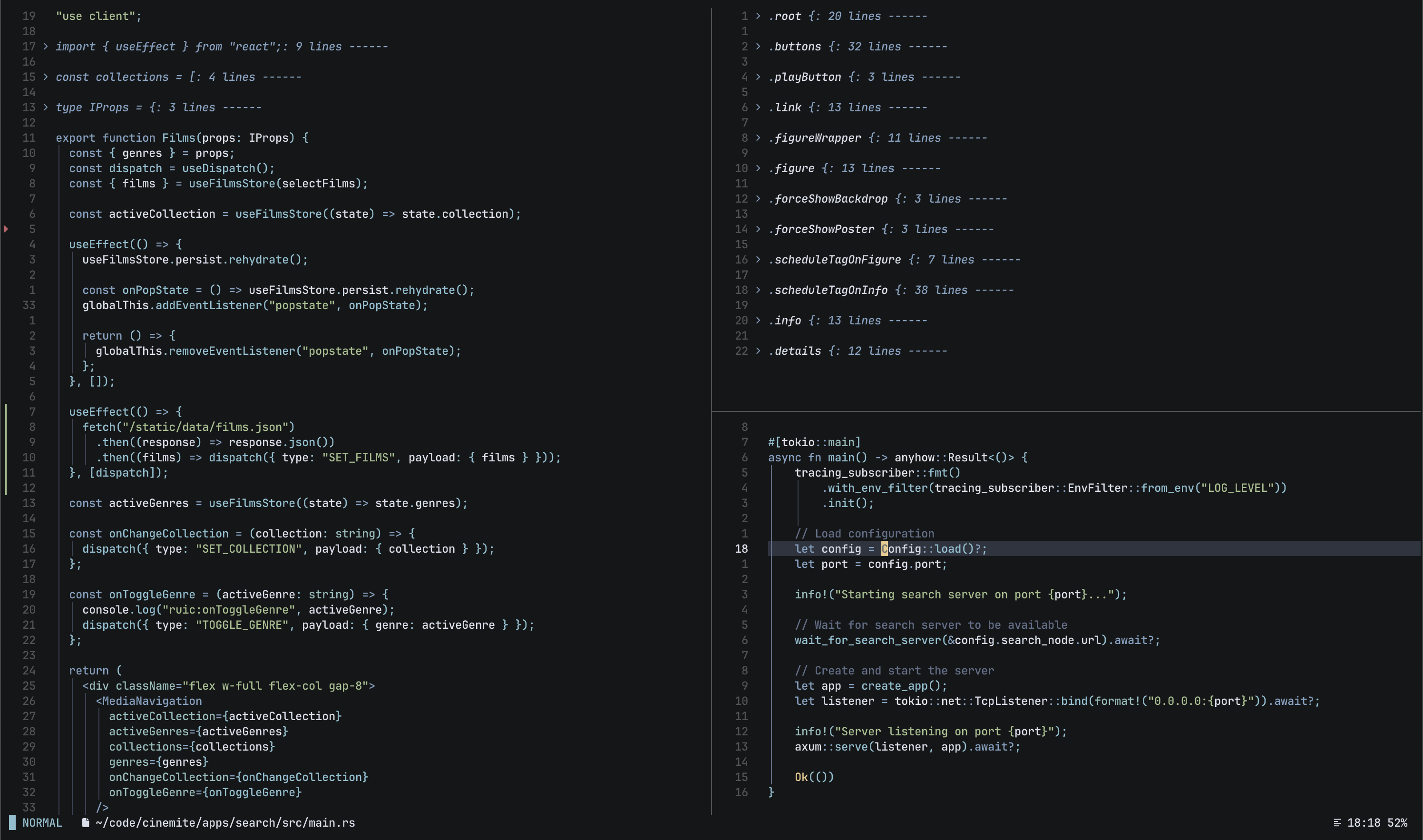
- NordStone - Custom theme based on Nord Theme.
- JetBrainsMono Nerd Font
61 plugins
- autopairs - Auto-pairs
- autotag - Auto close/rename tags
- blink.cmp - Autocomplete
- conform - Formatter
- match-up - Matching pairs/words
- mini.hipatterns - Highlight patterns in text
- package-info - Dependency versions (package.json)
- tailwincss-dial - Toggle TailwindCSS classes
- tailwind-hover - Tailwind CSS hover
- timber - Insert log statements
- treewalker - AST aware actions
- copilot.lua - Suggestions (copilot)
- reviewer - Send inline review comments to agent
- sidekick.lua - Agentic
- dial - Enhanced increment/decrement
- mini.ai - Around/inside textobjects
- mini.align - Align text interactively
- mini.bracketed - Navigation with square brackets
- mini.move - Move lines/selection
- mini.surround - Surround action
- multicursor - Multiple cursors
- readline - Insert/Command mode motions
- sort - Sort action
- spider - Move by subwords
- substitute - Substitute action
- text-case - Convert text cases
- visual-whitespace - Render whitespace
- yanky - Yank and Put actions
- auto-session - Session management
- hbac - Buffer auto-closer
- mini.clue - Keybindings helper
- mini.notify - Notifications
- scope - Tab scoping
- smart-splits - Windows resize
- termite - Terminal windows manager
- window-picker - Window picker
- winshift - Rearrange windows
- codediff - diff
- fugitive - status, commit, push
- snacks.gitbrowse - Open remote
- gitsigns - hunks, blame
- mini.diff - inline diff overlay
- fff - Search index (Snacks picker backend)
- flash - Jump with labels
- grapple - File bookmarks
- gx - Open links/files
- hlslens - Browse search results
- oil - Files explorer
- other - Open alternative files
- snacks.picker - Pickers
- yazi - Explorer
- mason-lspconfig - Bridge between mason and lspconfig
- mason-tool-installer - Tools installer
- mason - LSP package manager
- nvim-lspconfig - LSP config
- nvim-treesitter-context - Code context
- nvim-treesitter-textobjects - AST aware text objects
- nvim-treesitter - Treesitter syntax parsers
- rest - HTTP client
- vim-test - Test runner
- wakatime - Time tracking
Complex configuration options.
| foldtext | Text displayed for a closed fold |
| formatoptions | Format options |
| standard-plugins | Disable unused standard plugins |
| statusline | Content of the statusline |
| winbar | Content of the winbar |
| wrap | Toggle soft-wrap |
Custom configuration, keymaps, and features dependent on the file's type.
| dockerfile | Dockerfile |
| terminal | Terminal buffers |
| typescript | TypeScript LSP code actions |
New features built around autocmds (events).
| auto-close-buffer-if-deleted | Auto close buffer when deleted from disk |
| auto-resize-splits | Auto resize splits when window is resized |
| cmdline | Clean up after use, hide hit-enter messages on blur |
| default-filetype | Markdown for new/undetected buffers |
| help | Open Help in side panel |
| show-cursorline-only-active | Show cursorline only on active window. |
Random features added.
| duplicate-comment | Duplicate and comment |
| lsp-disable-semantic-tokens | Disable semantic tokens (LSP) |
| lsp-keymaps | Keymaps (LSP) |
| lsp-highlight-references | Highlight references (LSP) |
| lsp-jump-to-references | Jump to references (LSP) |
| lsp-python-set-venv | Set venv for python files (LSP) |
| vim-messages | Display :messages on a separate window |
-open directory explorer (Oil)_open current working directory (Oil)<tab>preview file<bs>go to parent directory<c-w>sopen in horizontal split<c-w>topen in new tab<c-w>vopen in vertical split<leader>-open Yazi at current file<leader>_open Yazi at current working directory<leader>.last picker<leader><space>files & buffers
<bs>switch to lastqclose<leader>,list
\{a,s,d,f,g}jump to\\{a,s,d,f,g}save to<leader>\list
==switch to=<space>switch to source=bswitch to test=mswitch to template=sswitch to style=yswitch to story
{jump up 6 lines}jump down 6 linesw/bnext/previous worde/genext/previous word end''jump to position before last jump'.jump to position where last change was madesjump with labels'{a-z}'jump to marked positionmmjump to matching pair[m/]mjump to previous/next matching wordgmjump to previous matchzmjump inside next block[[jump to earlier section (]]later)
|switchqclose<c-q>quit<c-w>tmove file to new tab<c-w>mmove window<c-w>xswap windows<c-w>ztoggle zoom<s-tab>toggle terminal<c-g>open file references (path[:line]) from terminal output<leader>wtoggle soft-wrap<leader>qclose side panels
<leader>/search in workspace<leader>?search in directory<leader>g/search current word in workspaceg/search current word / selection<leader>"registers<leader>'marks<leader>;jumps<leader>ucommand history<leader>pclipboard history<leader>ccquickfix list*/#search word under cursor forward/backwardg*/g#search partial word forward/backward[/search word under cursorgr/replace current word / selectiongw/web search current word / selection<c-w>/search first occurence in new windown/Nnext/previous result
[<space>add blank line above cursor (]<space>below)[ppaste to new line above (]pbelow)gCCduplicate[count]lines, comment out the first instancegCduplicate a selection, comment out the first instance (visual mode)UredoVselect until end of linevventer visual line mode<c-s>save<a-h>move line/selection left<a-j>move line/selection down<a-k>move line/selection up<a-l>move line/selection right<tab>toggle fold<leader>venter visual block mode
<c-b>jump character backward<c-f>jump character forward<a-b>jump word backward<a-f>jump word forward<c-a>jump to line start<c-e>jump to line end<c-h>delete character backward<c-d>delete character forward<a-bs>delete word backward<a-d>delete word forward<c-w>delete WORD backward<c-k>delete line forward<c-u>delete line backward<c-v>paste from clipboard (insert mode)<c-z>undo (insert mode)<c-n>jump to next match (command mode)<c-p>jump to previous match (command mode)
afunction argumentbbrackets ({}, (), [])ccomment%entire fileffunctionhgit hunkmmatching pairqquotes (", ', `)ssingle word in different casestHTML tags
<leader>~-to kebab-case<leader>~_to snake_case<leader>~Cto CONSTANT_CASE<leader>~Uto UPPER CASE<leader>~cto camelCase<leader>~pto PascalCase<leader>~uto lower case
Also available as <leader>g~{char} (LSP rename) and g~o{char} (operator).
y%path (relative)yLpath (relative) + line number
ys{motion}{char}add surrounding characterds{char}delete surrounding charactercs{target}{replacement}replace surrounding characterS{char}add surrounding character (visual mode)<leader>x{motion}exchange with another motion (<leader>xxline,<leader>xccancel)<leader>r{motion}replace with register (<leader>rrline,<leader>Rend of line)<leader>s{motion}sort (<leader>ssline)
<s-down>add cursor below (<s-up>for above)<leader><s-down>skip cursor below (<leader><s-up>for above)<c-s-down>add cursor to next match (<c-s-up>for previous)<leader><c-s-down>skip cursor next match (<leader><c-s-up>for previous)<leader>mmtoggle cursor<leader>xdelete cursor<esc>clear cursors
<c-n>show/next entry<c-p>previous entry<tab>show/next entry<s-tab>previous entry<cr>confirm<c-e>hide<c-f>scroll docs forward<c-b>scroll docs backward
<c-]>accept<c-d>dismiss<a-w>accept word<a-e>accept line<a-n>show next<a-p>show previous
<c-bslash>show/focus (visual mode: send selection)<c-w><c-bslash>toggle<c-b>buffer picker (agent terminal)<c-f>file picker (agent terminal)
glvinsert variable log belowglVinsert variable log aboveglpinsert plain log belowglPinsert plain log aboveglbinsert batch log belowglaadd to batch logglkinsert breakpoint belowglKinsert breakpoint abovegltinsert timestamp belowglTinsert timestamp above<leader>gltinsert timestamp above/below
<c-h>jump to parent node<c-j>jump to next sibling node<c-k>jump to previous sibling node<c-l>jump to child node<c-s-h>swap with left node (<c-H>on Windows)<c-s-j>swap with down node (<c-J>on Windows)<c-s-k>swap with up node (<c-K>on Windows)<c-s-l>swap with right node (<c-L>on Windows)]ajump to next parameter start ([aprevious)]fjump to next function start ([fprevious)]sjump to next className ([sprevious)
Kdisplay hover information for symbolgOlist symbols in documentgracode actionsgrtjump to type definitiongrijump to implementationgrnrename symbolgrrlist referencesgrIlist incoming callsgrOlist outgoing callsgrxrun code lens<cr>jump to definition<c-w>]jump to definition (vsplit)<leader>ddopen diagnostics (file)<leader>dDopen diagnostics (workspace)[rjump to previous symbol reference (]rnext)[ejump to previous error (]enext)[Ejump to first error (]Elast)
<leader>imadd missing imports<leader>ioorganize imports<leader>irremove unused<leader>issort imports<leader>iuremove unused imports
[cprevious change (]cnext)<leader>h~diffHEAD~{count}..HEAD<leader>h<c-bslash>AI review branch vs chosen base (defaults to default branch)<leader>hBbranches<leader>hDdiff explorer<leader>hHstatus (picker)<leader>hLsearch log<leader>hMreview branch vs chosen base (defaults to default branch)<leader>hdinline diff overlay (in place, vs index)<leader>hhstatus<leader>hlshow range history (visual mode)<leader>hl%log for file<leader>hl$blame line<leader>hRdiscard file<leader>hrdiscard hunk<leader>hSstage file<leader>hsstage hunk<leader>hxopen file in browser<leader>hXopen commit in browser
[xprevious conflict (]xnext)cbchoose bothcochoose currentctchoose incomingcxdiscard
<leader>barun all<leader>bbrun last<leader>b%run file<leader>bnrun nearest
<leader><tab><tab>new tab<leader><tab>qclose tab[<tab>previous tab]<tab>next tab<leader><tab>{1-9}go to tab
<leader>arrun request under cursor<leader>aRre-run last request<leader>aapick and run request<leader>aoopen result pane<leader>aeselect environment<leader>aEshow environment<leader>acedit cookies<leader>alopen logs
<leader>etoggle scratchpad<leader>Eselect scratchpad
<leader>ztoggle zen mode<c-w>ztoggle zoom
<leader>naautocmds<leader>nhhelp<leader>nHhighlights<leader>nkkeymaps<leader>nnvim-messages<leader>ncclear vim-messages
© 2024 Rui Costa, MIT License