


Device Sentinel tells you when a device in your house has stopped reporting, has a falling battery, or a low signal, even while Home Assistant still shows its last value.
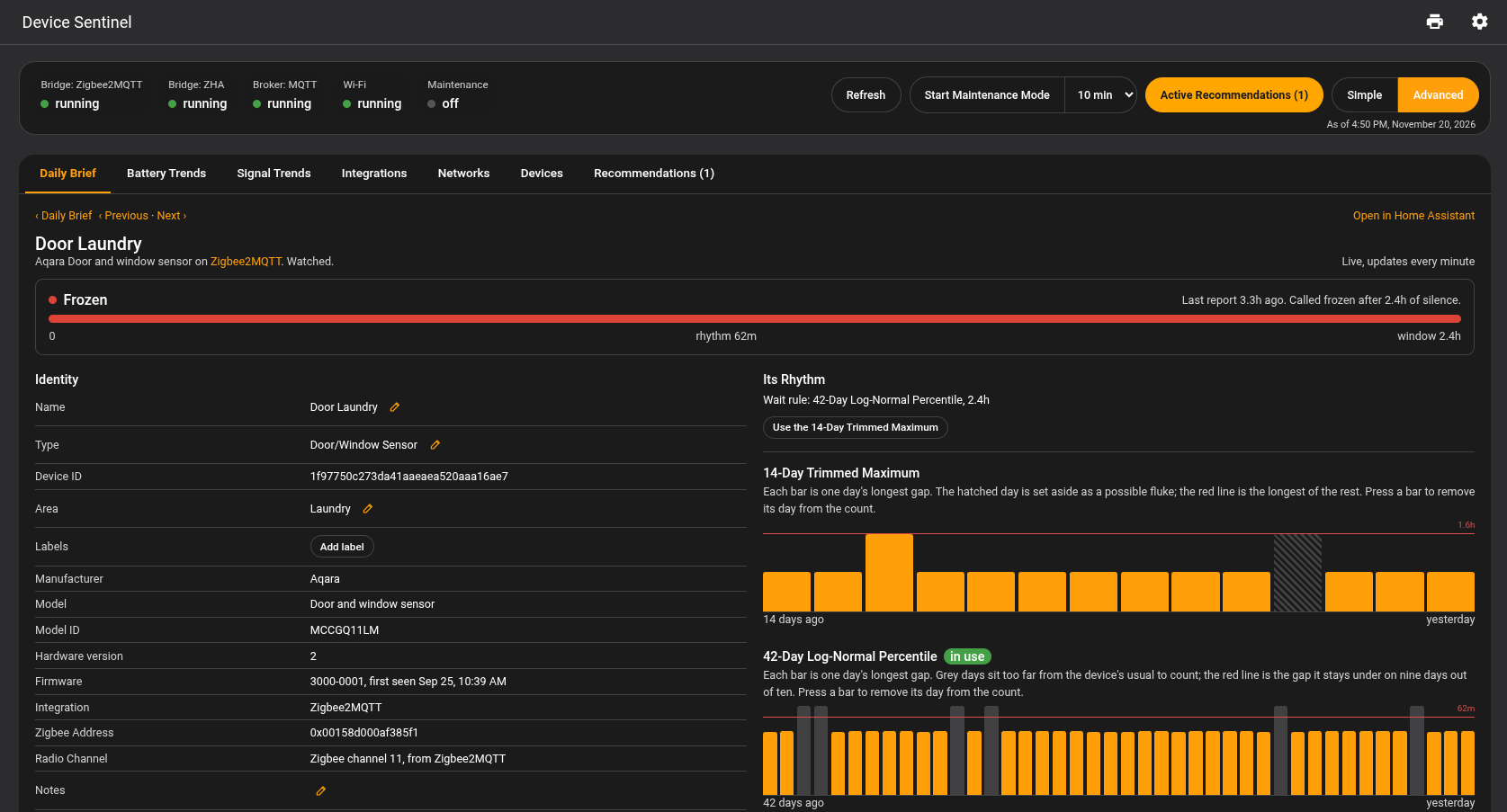
Home Assistant can't tell a quiet device from a dead one: a door sensor with a dead battery keeps reading "closed". Device Sentinel learns how often each device in your home reports and tells you when one goes quiet for longer than its normal. It also watches batteries and radio links, each against that device's own history.
| Problem | What Device Sentinel reports |
|---|---|
| Frozen | A device that stopped reporting while still showing a value. |
| Unavailable | A device Home Assistant has marked unavailable. |
| Short drop-outs | A device that becomes unavailable for a few minutes and recovers, again and again. |
| Never reported | A device that has never sent a reading. |
| Low or falling battery | A battery under your threshold, or draining fast enough to reach it soon. |
| Weak or stuck signal | A radio link weaker than normal, or a reading stuck at one value. |
When a Zigbee coordinator, the MQTT broker or your Wi-Fi network goes down, Device Sentinel reports that one failure, not each of its devices individually.
The story behind Device Sentinel, with more pictures, is in the overview.
Device Sentinel is in the HACS default store.

- Open HACS, search for Device Sentinel, and open it.
- Click Download, then Restart Home Assistant.
- Go to Settings > Devices and Services > Add Integration and search for Device Sentinel.
(Requires Home Assistant 2026.5 or newer)
Device Sentinel works with its defaults at the start. It begins learning your house during the first two weeks.
- Day one. Open the integration settings and set up Notifications and Daily Brief. Leave High-Priority targets empty for now, set Quiet Hours, and choose where to send the Daily Brief. Then open the Recommendations tab on the Device Sentinel dashboard and turn on any Last Seen, Battery or Z-Wave status sensors it lists as switched off. With Last Seen on, a frozen device is caught in minutes rather than hours.
- Week one: clear out the noise. While Device Sentinel learns, you may see things that aren't hardware, such as ping trackers, phone apps or a wall tablet. On the Exclusions and Muting screen in settings, or the dashboard's Integrations or Devices tab, exclude what isn't hardware, and mute what you don't mind going quiet.
- Week two: frozen devices are reported. From day 7, a device that stays quiet longer than its own usual is reported frozen. Expect a few false alarms. Mute devices that come and go by nature, such as a car sensor that leaves the driveway, or a device that becomes unavailable when switched off, like most TVs. By day 14, you can trust a frozen report.
- After that. Signal baselines settle after three weeks, and a battery is judged falling after four weeks of readings.
Installation and Setup in the wiki has each step in full.
The wiki explains each screen and setting.
- Something isn't working: open a bug report and attach your diagnostics download (Settings > Devices and Services > Device Sentinel, the three dots, Download diagnostics). Some questions don't require it, but it lets us see what your system is up to, so we can diagnose your problem quickly and tell you about anything else we see. We take steps to protect your privacy.
- A question: ask in the Device Sentinel thread on the Home Assistant forum, or open an issue.
- An idea: open a feature request. Say what happened in your home that it would have caught.
- A security problem: report it privately, as SECURITY.md describes. Don't open a public issue.
You don't need to write code to help. Device Sentinel learns from real houses.
- Your hardware: if your hub, integration or router isn't fully supported, turn on Extended Diagnostics and send the files. CONTRIBUTING.md walks through it.
- Your opinion: run Device Sentinel for a week or two, then open an issue titled "Review" and tell me what worked and what didn't.
- Code: read CONTRIBUTING.md first. Device Sentinel's rules are in the
developerfolder, and the code refers to them by name.
The hardware that has already run on real houses is listed in TESTED_HARDWARE.md. The integrations checked for how they report after a restart are listed in TRUSTED_INTEGRATIONS.md, and the makes and models in UNTRUSTED_DEVICES.md.
| Area | Status | Notes |
|---|---|---|
| Dashboard | Working | Simple shows what is broken and what to do about it; Advanced adds the trends, charts and setup. Administrators only. |
| Freeze Detection | Stable | Frozen and unavailable devices, and short drop-outs, each judged against its own rhythm. |
| Battery | Stable | Low batteries, and batteries falling or speeding up, predicting their time left. |
| Signal | Experimental | Weak links shown on the dashboard; stuck readings alert. |
| Storage | Hardened | Survives power cuts and restores itself from a backup. |
| Zigbee2MQTT | Working | A bridge outage is one alert, and your re-pairs are never mistaken for faults. |
| MQTT | Working | A broker outage is one alert, not one per device. |
| ZHA | Working | A coordinator outage is one alert, and your re-pairs are recognized. |
| WiFi | Working | A Wi-Fi outage is one alert. Needs a wireless adapter on your server or a supported router. |
| Z-Wave | Working | A node Z-Wave JS reports dead makes its device unavailable. |
| Matter | Working | A light, plug or button that reports only when used is not reported frozen because it is quiet. |
| Lutron Caséta | Experimental | Devices are judged by their hub: a hub that goes down is one alert. |
Each Latest release is listed in the changelog and on the releases page.
Device Sentinel was built with AI assistance under our direction. Every design decision is ours, and nothing reaches this repository without our review and a full test gate, with detection proven on real hardware. AI_DISCLOSURE.md explains exactly what the AI did and how every release is checked.
License: GPL-3.0-or-later. Copyright (C) 2026 James Lander, The Thinking Home.
Battery types come from the device library of Battery Notes by Andrew Jackson, shipped with Device Sentinel under its MIT licence. The notice is in custom_components/device_sentinel/data/BATTERY_LIBRARY_LICENSE.md.