
Looking to turn your ESP32 into a powerful Edge Controller or IoT Gateway? Look no further than Xedge32! This incredible development tool empowers users of all levels to program their ESP32 using the simple and intuitive Lua Scripting language. With Xedge32, you can easily unlock the full potential of your ESP32 and create advanced IoT solutions that will impress even the most tech-savvy enthusiasts.
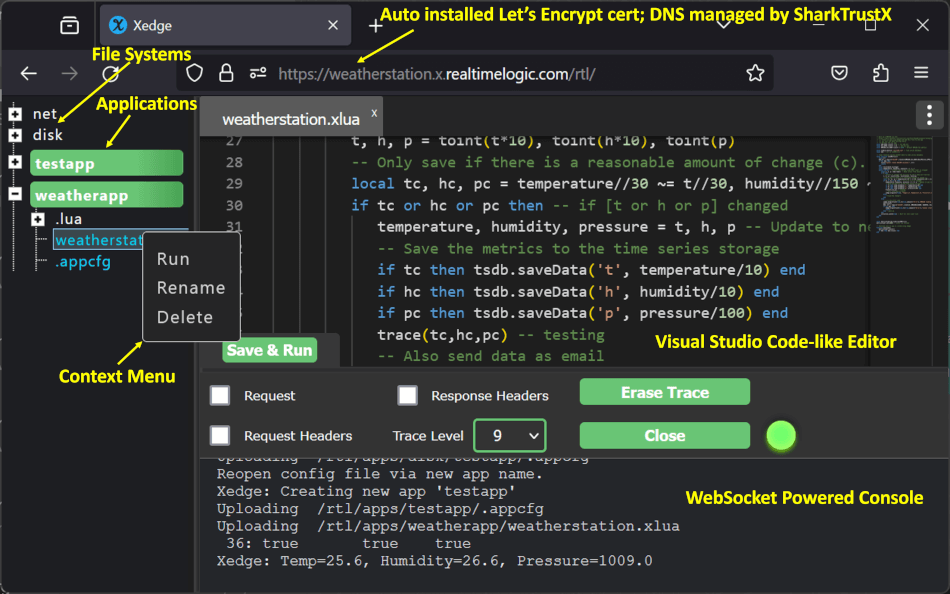
Figure 1: Xedge32 in developer mode
You do not need to compile Xedge32. Compiling Xedge32 is for C code experts.
- Download the Xedge32 Firmware
- Xedge32 Tutorials
- Xedge32 South Bridge API - GPIO and HW APIs
- How to use Xedge32 in developer mode
As outlined in the tutorial Your First Xedge32 Project, Xedge32 is explicitly built for OEM integration. It's an ESP32 customized version of the more general-purpose Xedge framework, which itself is powered by the Barracuda App Server.
For more details:
Note: Xedge32 is built on the more generic Xedge, which itself is based on the Barracuda App Server library. Xedge32, Xedge, and the Barracuda App Server are OEM software components designed for easy integration into OEM products. All components are designed to be extended.
Prerequisites:
sudo apt -y update
sudo apt -y install git zipSee the ESP-IDF Release v6.1 for details.
git clone --recursive https://github.com/RealTimeLogic/xedge32.git xedge
cd xedge
git submodule update --init --recursivechmod +x BuildESP32ResourceFile.sh
./BuildESP32ResourceFile.sh #set target to one of:
#idf.py set-target esp32
#idf.py set-target esp32s3
#idf.py set-target esp32p4 # Configure Xedge32 options (See Configuring Xedge32 below)
#idf.py menuconfig
# Build the code
idf.py buildWindows: The code can be compiled in a Linux console, including the Windows Subsystem for Linux (WSL). If you use WSL, it's recommended to use generation one (WSL1), as it can be difficult to get the USB serial working in WSL2. For more information, see the WSL documentation.
To upload the firmware to your ESP32, follow these steps:
- Wait for the build process to complete.
- Upload the code using:
- Linux: idf.py flash monitor
- WSL: idf.py -p /dev/ttyS4 -b 115200 flash monitor
To configure Xedge32, use the idf.py menuconfig command. This allows you to enable various features such as mDNS, Camera, OPC UA, and softTPM eFuse registers. Below is an overview of each feature, along with configuration tips.
mDNS (Multicast DNS) enables local network discovery, making it possible to access Xedge32 by navigating to http://xedge32.local in your browser. You can customize this name within your Lua script if desired.
OPC UA is an industrial protocol useful for machine-to-machine communication. To enable OPC UA:
- Use
idf.py menuconfigand select the OPC UA option. - After configuring through menuconfig, ensure that you also choose "Yes" when prompted by
BuildESP32ResourceFile.sh.
The softTPM eFuse option allows for secure storage of secrets directly in eFuse registers, making them permanently accessible on the device. This feature is part of the advanced security configuration settings. For full details on available configuration options, refer to the configuration section in the generic Xedge build documentation.
Lua apps and the Xedge configuration file can be embedded in the firmware binary using fatfsgen.py and nvs_partition_gen.py. See the Partitions Generator Utility readme file for details.
OEM integration means you are not using Xedge32 as a one-size-fits-all product. You are working with a platform designed to be embedded inside your firmware. Instead of starting from scratch, you extend and customize the platform to fit your specific needs, then ship it as an integral part of your product.
Xedge32 is built for precisely this. It gives you a solid base, and with Lua, you can add features, tweak behavior, and expose your own Lua to C APIs without modifying the core system. For a high-level conceptual view, check out the article Using Lua for Embedded Development vs. Traditional C Code and the tutorial on creating Lua to C code APIs.
This distribution includes cryptographic software. The country in which you currently reside may have restrictions on the import, possession, use, and/or re-export to another country, of encryption software. BEFORE using any encryption software, please check your country's laws, regulations and policies concerning the import, possession, or use, and re-export of encryption software, to see if this is permitted. See http://www.wassenaar.org/ for more information.
The U.S. Government Department of Commerce, Bureau of Industry and Security (BIS), has classified this software as Export Commodity Control Number (ECCN) 5D002.C.1, which includes information security software using or performing cryptographic functions with asymmetric algorithms. The form and manner of this distribution makes it eligible for export under the License Exception ENC Technology Software Unrestricted (TSU) exception (see the BIS Export Administration Regulations, Section 740.13) for both object code and source code.
The following page provides details on the included cryptographic software: https://github.com/RealTimeLogic/SharkSSL